
MapleSim Add-ons and Toolboxes
Overview
B&R MapleSim Connector
Make virtual commissioning easier by using your MapleSim models within B&R Automation Studio, allowing you to visualize, test, and validate your machine’s control strategies.
With the B&R MapleSim Connector, Toolboxes and Connectors digital twin technology can be integrated with the control software development process, making virtual commissioning a realistic technique for automation companies to adopt today. The B&R MapleSim Connector creates a simplified workflow between the system-level modeling environment (MapleSim) and the automation design environment (B&R Automation Studio). This connector allows designers to create their digital models and test their PLC code in the same workflow, providing valuable feedback during the design phase where changes are easier and less expensive to implement.
Advantages of the B&R MapleSim Connector include:
- Quickly create a digital model by leveraging previous CAD data for use in both MapleSim and B&R Automation Studio
- Get your design and actuators right before prototyping
- Test your control software before connecting it to a physical machine
- Debug your machine software by seeing the mechanism’s response to your control code in B&R’s scene viewer
- No guessing with effective inertias and approximated accelerations – directly export a model’s forces/torque to SERVOsoft
- Perform predictive maintenance and diagnostics by comparing the model’s simulation data with the sensed torque/force loads of a machine
MapleSim Connector
Automatic generation of Simulink® S-functions from MapleSim models. The generated ANSI-C code is compatible with Simulink Coder™ for simulation on supported platforms such as dSPACE®, xPC Target™ and B&R Automation Studio Target for Simulink®.
With the MapleSim Connector, you can enhance and extend your Simulink® models by integrating MapleSim’s high-performance, multi-domain environment into your existing toolchain.
You can quickly develop and optimize engineering system models in the intuitive physical modeling environment of MapleSim. Using this toolbox, high-performance, high-fidelity MapleSim models are automatically converted to S-Function blocks for seamless inclusion in Simulink diagrams.
The MapleSim Connector:
- Exports any MapleSim model to Simulink, including models with custom components
- Creates Simulink S-Function blocks for fast execution within Simulink and real-time implementation through Simulink Coder™ for simulation on supported platforms such as dSPACE®, xPC Target™ and B&R Automation Studio Target for Simulink.
- S-Functions are created from the symbolically simplified system equations produced by MapleSim, resulting in compact, highly efficient models.
- The resulting code is further optimized using the powerful optimization tools in Maple, ensuring fast execution.
- S-Functions are created from the symbolically simplified system equations produced by MapleSim, resulting in compact, highly efficient models.
MapleSim Connector for JMAG®-RT
The MapleSim Connector for JMAG-RT allows you to combine the powerful finite element analysis (FEA) abilities of JMAG with the advanced physical modeling approach of MapleSim.
The MapleSim Connector for JMAG-RT allows you to combine the powerful finite element analysis (FEA) abilities of JMAG with the advanced physical modeling approach of MapleSim to produce high-fidelity system models that seamlessly incorporate components from each system.
- Include highly detailed motor and generator models from JMAG as part of your MapleSim multidomain system models.
- Further refine your system model by implementing power output characteristics, such as torque and speed, based on inductance and counter-electromotive force information from the JMAG model. For example, you can incorporate non-sinusoidal fluxes and currents that are a result of asymmetric motor construction.
- Produce highly optimized, auto-generated code of your entire system model, suitable for real-time execution and hardware- and software-in-the-loop testing.
MapleSim Connector for FMI
Export MapleSim models in a standard format, established with the help of the Modelica Association, that is easily understood by other FMI-compliant tools.
The MapleSim Connector for FMI allows you to share high-fidelity, multidomain models created in MapleSim with other modeling tools that support the FMI (Functional Mockup Interface).
FMI is a standard format for defining models and components established by the Modelica Association to facilitate the sharing across different tool sets. This open standard is supported by many development and modeling tools, including full modeling environments, finite element tools, and programming languages.
- Save development time by using the open modeling environment and flexible analysis tools of MapleSim to develop your design.
- Easily convert your model to an FMU (Functional Mockup Unit) for seamless incorporation inside a second tool.
- Take advantage of the highly efficient code generation of MapleSim, which creates extremely fast auto-generated model code for your system.
- Save money with royalty-free distribution of generated code.
MapleSim CAD Toolbox
Investigate how your mechanical models will behave when part of a larger system by incorporating your CAD models into MapleSim’s multidomain, system-level modeling environment.
With the MapleSim CAD Toolbox, you can see how your mechanical CAD models will behave as part of a larger, multidomain system, and apply MapleSim’s advanced analysis tools to improve your designs. This toolbox makes it easy to import CAD models into MapleSim, automatically capturing the kinematic and kinetic properties of the model components.
- Easily import your CAD models into MapleSim, including kinetic and kinematic properties, and spatial relationships between components
- Investigate how your mechanical models will behave when part of a larger system by incorporating them in a multidomain, system-level simulation model
- Use MapleSim’s analysis tools to investigate and optimize your CAD designs and final application
MapleSim Control Design Toolbox
A solid set of essential control design tools that extend MapleSim’s exceptional plant modeling capabilities to support control design.
The MapleSim Control Design Toolbox provides a solid set of essential control design tools that extend MapleSim’s exceptional plant modeling capabilities. The MapleSim Control Design Toolbox provides:
- Greater flexibility and accuracy in your controllers. The symbolic approach for designing, analyzing, and testing control systems produces superior results.
- Increased reusability of your controller designs. You can document your design decisions using the extensive technical documentation tools available with MapleSim.
- An accelerated design process. Developing your plants and controllers together in the same environment reduces the need for inefficient tool-swapping.
In MapleSim, you have access to standard PI and PID controllers.
The MapleSim Control Design Toolbox greatly expands on these standard controllers with tools for model linearization, PID tuning, state space control strategies, and custom compensator design.
MapleSim Tire Library
Extend MapleSim vehicle models with high-performance pneumatic tire component models.
Overview of the MapleSim Tire Library
With the MapleSim Tire Library, engineers can extend their high-fidelity, multi-domain MapleSim vehicle models with high-performance pneumatic tire components. The MapleSim Tire Library provides MapleSim users with industry standard tire force model components such as Fiala, and Pacejka’s magic tire formula. In addition, linear tire models and user-defined tire models are available to provide flexibility for investigation and analysis. With the easy-to-use point-and-click MapleSim graphical environment, these fully parameterized force models can be integrated into existing vehicle dynamics models by simply dragging the component into the diagram and connecting it to the vehicle model.
Highlights
- Kinematic quantities, such as slip angle, longitudinal slip, and inclination angle are derived automatically and are available to the user. These quantities are used by the various tire force models to determine tire forces and moments
- Engineers can control how the tire slip and rolling radius are calculated, and include tire transients through differential equations involving relaxation lengths
- The following industry standard tire models are supported: Fiala, Pacejka 2002, and Pacejka 2012. For custom research and development applications, user-defined tire models can be easily constructed using an intuitive interface
- Manage tire parameters easily with an intuitive app for organizing and handling your tire parameters across your model
- Test and simulate models on uneven terrains, giving you a wide range of environments to evaluate your model’s performance
Because the MapleSim Tire Library is a fully integrated add-on package to MapleSim, models incorporating these components can take full advantage of MapleSim functionality. As a result:
- Dynamic and kinematic quantities, such as normal force and slip angle, can be plotted and analyzed easily
- Parameter sets can be stored and loaded from files to easily test and analyze different sets of tire properties
- Realistic tire motion can be animated by attaching a CAD image to a tire model component.
- High-performance, high-fidelity vehicle dynamics models can be exported for use in real-time simulations. Models can be exported to C code using built-in code generation tools, and to Simulink™, LabVIEW®, and NI VeriStand™ using MapleSim connector products (available separately)
MapleSim Driveline Library
Mix the best of physical models and empirical data to maximize model fidelity, optimize your designs, and improve overall vehicle fuel-efficiency.
As automotive manufacturers strive to improve vehicle fuel efficiency, much of the focus is on the engine as the primary source of power loss in the vehicle powertrain. However, there is arguably as much loss through the transmission. Engineers are putting increasing effort into assessing exactly how much power is lost, and what can be done to reduce losses and improve overall efficiency. These investigations can be done using system-level modeling and real-time testing using hardware-in-the-loop (HIL) simulations.
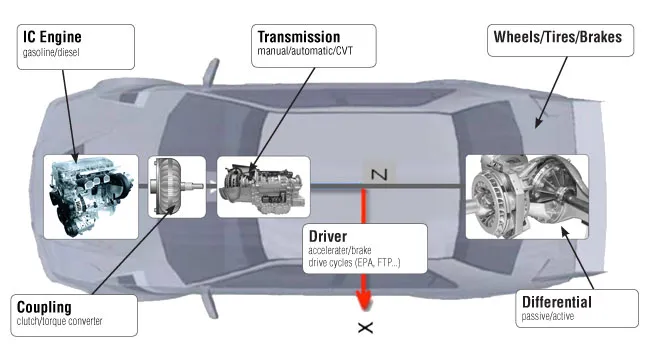
Maplesoft has developed the MapleSim Driveline Library, a collection of components, transmission sub-assemblies, and complete powertrain examples that show the use of these components in driveline applications. Built with guidance from several transmission manufacturers, this MapleSim library allows you to mix the best of physical models and empirical data to maximize model fidelity, optimize your designs, and improve overall vehicle fuel-efficiency.
The MapleSim Driveline Library was designed with HIL simulation specifically in mind. For HIL simulations, it is critical that your models execute at real-time speeds. Too often, you are forced to simplify model details in order to achieve this performance. With MapleSim and the MapleSim Driveline Library, however, you can achieve real-time speeds for complex models where other tools would fail. MapleSim’s fast simulation code allows you to develop and test your applications using high-fidelity models, so you get better results, faster.
Highlights:
- Covers all aspects of the powertrain, from the engine to the differential, wheels, and road loads
- Designed specifically to allow high-fidelity models to run in real-time for HIL simulation
- Provides “lossy” versions of many components that allow losses due to tooth meshing, bearing friction, and slip to be readily incorporated using external calculations and empirical look-up tables
- Supports an acausal approach to model development, so you can simply connect components together without worrying about issues such as torque/speed directions and load flow
- Allows you to easily modify pre-built components to suit your specific requirements and increase model fidelity
- Provides building blocks so you can easily create new transmission models
The MapleSim Driveline Library includes the following components:
- Basic Gear
- Planet Planet Gear
- Planetary Gear
- Dual-ratio Planetary Gear
- Counter-rotating Planetary Gear
- CR-CR Gear
- Ravigneaux Gear
- Simpson Gear
- Simpson Actuation (3-Speed)
- CR-CR Actuation (4-Speed)
- Ravigneaux Actuation (4-Speed)
- Lepelletier Actuation (6-Speed)
- Lepelletier Actuation (7-Speed)
- Clutch
- Dog Clutch
- Beveled teeth Dog Clutch
- One Way Clutch
- Cone Clutch
- Brake
- Translational Detent
- CVT
- Torque Converter
- Engine
- Dynamometer
- Loss element
- Bearing Friction
- Damper
- Differential
- Active Limited Slip Differential (ALSD)
- Longitudinal Vehicle Dynamics
- Tire
- Gear Shifter
- Ratio Selector
MapleSim Heat Transfer Library
Gain a comprehensive view into the heat transfer effects present in your model, to improve performance and avoid overheating.
Find and fix heat transfer issues earlier in your design process.
- Spot heat transfer issues earlier, saving time and money on design changes
- Quickly test new configurations with simulations that run in seconds, not hours
- Test for heat effects on dynamic, transient effects of your design
Overview of the MapleSim Heat Transfer Library
The MapleSim Heat Transfer Library gives you a comprehensive view into the heat transfer effects present in your model, enabling you to refine your design to improve performance and avoid overheating. This component library is useful for any situation where heat generation is a concern, especially when there are moving boundaries between heat generating components, such as motors, batteries, printers, and manufacturing equipment.
- Gain a comprehensive understanding of the heat transfer effects in your model.
- Easily test out new configurations much more quickly than with other modeling tools.
- Generate the discretized model using common, built-in geometries and then automatically check the temperature distribution in system-level simulations.
- Customize the materials and geometry of your design when dealing with more complicated geometries.
MapleSim Battery Library
Incorporate physics-based predictive models of battery cells into your models so you can take battery behavior into account early in your design process.
Overview of the MapleSim Battery Library
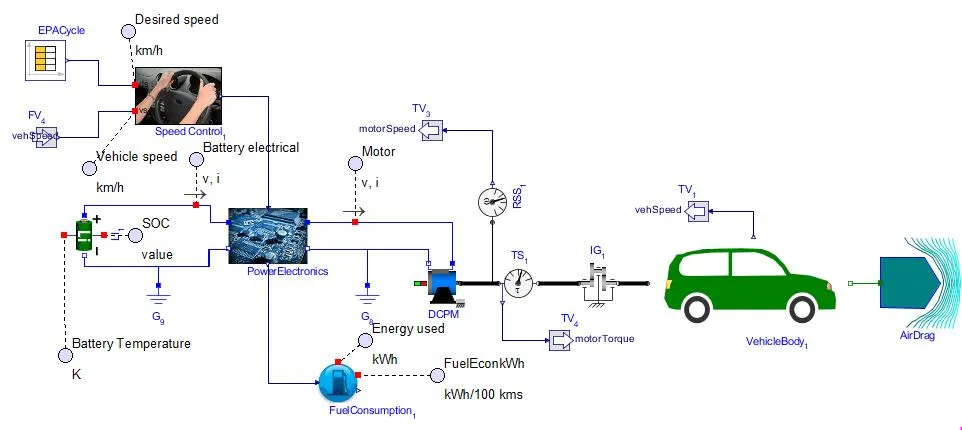
The MapleSim Battery Library allows you to incorporate physics-based predictive models of battery cells into your multidomain system-level models.
- Save time and avoid problems by taking battery behavior into account early in your design process.
- Understand the loading effect on the battery as it undergoes many different duty cycles and how the battery will behave as part of the greater system.
- Gain a better understanding of the heat flow in the battery, how rising temperature and age affects efficiency, and what critical factors could cause thermal runaway.
- Adjust your designs to optimize performance and reduce the risk of undesirable effects.
Applications
The MapleSim Battery Library can be used in any modeling project that involves batteries, including consumer electronics, electric and hybrid-electric vehicles, power electronics, energy generation and storage, and more. Typical projects include:
- Battery-load analysis and optimization to maximize time between charges
- Hardware-in-the-loop (HIL) testing of Battery Management Systems (BMS)
- Thermal modeling and cooling system optimization to stabilize battery temperature
- Study of mechanical loading effects on battery charge
- State of health effects on charge/discharge efficiency and thermal runaway
- Battery aging/degradation studies
MapleSim Ropes and Pulleys Library
Model the dynamics of rope and pulley systems, and view enhanced 3-D visualizations of your system’s performance.
The MapleSim Ropes and Pulleys Library allows you to easily create winch and pulley systems as part of your machine development.
Reduce the risk of design issues with accurate, dynamic simulations of winch and pulley systems.
- Ensure the proper functioning of both 2-D and 3-D pulley systems before physical prototypes
- Solve existing issues earlier by simulating pulley slippage, chain masses, cable bending, and more
- Test designs quickly with accurate, 3-D visualizations of pulley systems
Overview of the MapleSim Ropes and Pulleys Library
The MapleSim Ropes and Pulleys Library allows you to easily create winch and pulley systems as part of your machine development. Using this add-on library to MapleSim, you can model the dynamics of rope and pulley systems, and view enhanced 3-D visualizations of your system’s performance. Use the Ropes and Pulleys Library to add fidelity to your machine models with ropes, chains, cables, pulleys, and more.
Highlights
- Create both 2-D and 3-D pulley systems using components such as fixed and floating pulleys, winches, ropes, chains, and cables.
- Incorporate realistic behaviors of ropes and pulley systems, including pulley slippage, chain masses, cable bending, and wind loading.
- Explore systems with 3-D visualizations that show material flow and system tension using force arrows and color mapping.
MapleSim Web Handling Library
Simulate roll-to-roll processes when handling paper, foil, and film, helping you manage tensioning, optimize the web speed and reduce web slippage.
MapleSim for Web Converting Systems
Level up your business – driving innovation and unlocking know-how.
See the impact of changing web materials, line speed, or upgrading roller layouts on a virtual model – reducing the need for physical web line testing.
The MapleSim web handling simulation tool brings a set of modeling components to simulate roll-to-roll processes, helping you manage tensioning, optimize the web speed and reduce web slippage.
With MapleSim’s simulation tool, you can:
- Gain comprehensive insight into the web tension of the entire web line. Find out how dynamic elements like dancers and accumulators, drives, and feedback controllers affect the system performance.
- Find issues, discover the root cause, and quickly and easily try out system modifications.
- Predict slippage, identify sensor and controller issues, discover and mitigate system resonances.
- Compare and optimize design modifications to find the best engineering solution to web handling challenges.
- See how changing material properties would affect the performance. Find out what to do to resolve any potential issues.
MapleSim Explorer
Make the knowledge embedded in your MapleSim models available to more people in your organization, to support their decision making.
Get more out of your MapleSim models!
The MapleSim Explorer provides a cost-effective deployment solution that enables you to make your MapleSim models available to more people in your organization. With the MapleSim Explorer, you can make the knowledge embedded in your MapleSim models available to other engineers to support their decision making. As a result, you can avoid overloading your modeling experts with requests that do not require modeling expertise, while still getting the answers your organization needs.
- Run simulations of any MapleSim model
- Change model parameters
- Investigate and plot any model variables
- View 2-D simulation results and 3-D simulation animations
- Compare simulation runs and analyze the effects of parameter changes using the MapleSim Results Manager
- View the model diagram, default parameter values, and component definitions
- Analyze the model using MapleSim Apps, such as Parameter Sweep, Optimization, and Monte Carlo
The MapleSim Explorer is a complementary deployment solution to the MapleSim Server, which provides access to interactive applications based on MapleSim models through a web browser.
MapleSim Insight
MapleSim Insight gives machine builders powerful, simulation-based debugging and 3-D visualization capabilities that directly connect to your automation tools, so you can perform simulation-based testing of your controller easily and efficiently.
Give non-experts an easy way to simulate, visualize, and explore their digital twins, and unlock virtual commissioning by connecting models directly to your automation tools.
Find simulation-based control efficiencies to run your hardware at peak performance.
- Develop optimized control code by testing against realistic machine models
- Fix unwanted vibrations or other machine issues without resorting to hardware upgrades
- Get real-time, 3-D visualizations of your machine’s response to control strategies
Simulation-based testing of machine control strategies is a key element of virtual prototyping and the use of digital twins for virtual commissioning. Unfortunately, this step can be cumbersome, as many automation tools provide limited options for machine-level, simulation-based controller testing, and these options often require moving development to an entirely new platform. MapleSim Insight gives machine builders powerful, simulation-based debugging and 3-D visualization capabilities that directly connect to your automation tools, so you can perform simulation-based testing of your controller easily and efficiently. MapleSim Insight provides both 3-D visualizations for quick visual feedback, and 2-D plots to get precise answers for testing and debugging, so you can always get the level of detail you need. With a real-time connection to most common automation platforms, MapleSim Insight shows you exactly how your control strategies will impact your machine – all before a physical prototype is constructed.
MapleSim Insight Features
- Test the impact of your control strategies in real-time to fix issues and optimize performance without a physical machine present.
- See 3-D visualizations of your models that run in real-time, giving you a high quality, CAD-based reference for your control strategy development.
- Compare results from multiple testing scenarios using both 2-D plots and 3-D animations.
- Use MapleSim Insight with any of your tools that support compiled Function Mock-up Units, such as the Rockwell Studio 5000® Environment or MathWorks® Simulink
MapleSim Server
Explore MapleSim simulation models from a web browser. Access your models from computers and mobile devices using a standard web browser, no plug-ins required.
The MapleSim Server provides an easy web deployment option for your MapleSim-based solutions. The MapleSim Server allows engineers throughout your organization to explore MapleSim simulation models from a web browser, even if they do not have MapleSim.
- Explore MapleSim simulation models from a web browser. Access your models from computers and mobile devices using a standard web browser, no plug-ins required.
- Access, explore, and analyze models. Change parameters, manipulate model equations, run new simulations, see updated results, generate simulation code for export, and more.
- Combine compiled code speed with interactive explorations. In your application, your model is represented by parameterized, compiled functions, so you get results fast.
- Eliminate versioning problems. The application lives in a single, central location so updates can be deployed quickly throughout your organization.
- Fully control access to your solution. Leverage your proven web access security methods to specify who is allowed to access your models.
- Reduce licensing fees. MapleSim and Maple licenses are not required by the users of your MapleSim Server applications.
MapleSim Modelica Engine
The MapleSim Modelica Engine can be licensed as an OEM product for inclusion in your own applications and products.
Take advantage of the powerful MapleSim simulation engine in your own applications
The MapleSim Modelica Engine is the powerful system-level modeling engine that lies at the heart of MapleSim. This engine can be licensed as an OEM product for inclusion in your own applications and products.
What is Modelica used for?
Modelica® is an open-standard, object-oriented, system-level modeling language for describing physical models and components.
- Models and components are open and can be modified, making them easy to reuse, customize, and extend.
- Modelica® has diverse applications in modeling, simulation, and optimization of complex multidomain systems such as ground transportation, automotive transmissions, space systems, marine plant, batteries, electric powertrain, and much more.
Why Choose the MapleSim Modelica Engine?
As a “white-box” Modelica platform, MapleSim gives you complete flexibility and openness for complex multidomain models. Create, analyze, and run system-level models in a fraction of the time it takes with other tools.
Product Highlights
With MapleSim you can access the underlying Modelica code and the models can be saved directly as Modelica files.
Learn about the MapleSim technology included in the MapleSim Modelica Engine.
- Multidomain modeling engine with built-in support for electrical, thermal, mechanical, hydraulics, magnetic, multibody, and more.
- Modelica parser and compiler, so you can expand the built-in collection of components with other Modelica libraries or customize your components using the Modelica language
- Suite of powerful differential equation solvers, and symbolic code optimization for extremely fast, high fidelity simulations
- Connect to your automation software including B&R Automation Studio, Simulink®, LabVIEW™, and all FMI-compatible tools
- Flexible API for embedding the engine into your application, with assistance available from experienced Maplesoft experts
- Broad platform support: Windows®, Mac®, and Linux®